
SEO Tips for Beginners
Search Engine Optimization (SEO)
SEO is one of the most effective ways to make your website visible and draw organic traffic from Google search engines. For beginners, SEO can appear daunting, but it need not be.
By mastering a basic set of tools—selection of the necessary keywords, filling a site with useful content, and optimizing the site structure, it is possible to maximize the likelihood that the website will be in the top search engine results.
This guide will walk you through easy, practical SEO tips that are try and tested to help you build a strong base for success in the long run online.
What Is SEO
SEO or Search Engine Optimization is the way to make a website better so that when people search for things on the internet the website will show up higher in the search results like on Google.
In words SEO is about helping a website get more visitors without paying for it and this is done by making it easy for search engines to understand and recommend the website.
Why SEO Is Important
SEO is very important because it helps a website show up when people search for things.
By using the keywords making good content and having a good website structure SEO can help a website get seen and get visitors without paying for ads.
This helps improve the websites presence and also helps build trust and credibility because people tend to trust the top search results.
How Search Engines Actually Work
First search engines send out bots to look around the internet.
These bots visit websites follow links and find pages.
Then the search engine stores the pages in its databases so it knows what is, on each page.
When someone searches for something the search engine looks at all the stored pages. Ranks them based on how relevant, good and trustworthy they are.
The best results show up at the top of the search page.
Finally the search engine shows a mix of results, special snippets and other relevant results, like images and videos to the most relevant pages.
Keyword Research
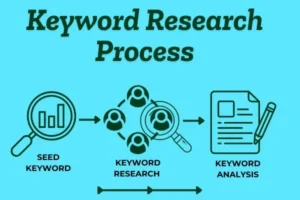
Keyword research is the first and most important step in SEO because it defines what your audience is actually searching for and the exact words they use. It is not just about picking popular terms, but about understanding user intent and aligning your content with real search queries. When keyword research is done correctly, it helps your content reach the right people at the right time.
What Makes a Good Keyword?
A good keyword hits the mark for what users actually want. You’ve got to nail the intent—figure out if people are looking for info, trying to buy something, or just want to visit a specific site. It matters that enough people are searching for it, but you don’t want to target keywords drowning in competition, especially if you’re just starting out. Aim for those with reasonable search volume and lower competition. And don’t forget, relevance is key. If the keyword doesn’t fit your website, the traffic won’t stick or convert.
Types of Keywords
Keywords come in different flavors depending on what people are after. Informational keywords pop up when someone wants to learn, like “What is SEO?” Transactional keywords show buying intent, like “Buy running shoes online.” Navigational keywords help people find a particular site, like “YouTube login.” Then you’ve got commercial keywords for people comparing products or planning to buy, like “Best SEO tools.” Knowing these types lets you shape your content to match what visitors expect.
Why Long-Tail Keywords Are Best for Beginners
If you’re new to this, go for long-tail keywords—those longer, super specific phrases. They don’t draw as much competition, and visitors searching them usually mean business. Take “SEO,” for example; it’s way too broad and crowded. “SEO tips for beginners” is better, and “SEO tips for beginners with no experience” is even more specific. These keywords pull in the kind of people who’ll actually want what you’re offering.
Free Keyword Research Methods
Getting started with keyword research doesn’t mean you have to pay for tools. Google’s autocomplete spits out real search ideas as you type. “People Also Ask” shows questions people are asking. At the bottom of the page, related searches give you more inspiration. Once your site’s going, Google Search Console lets you see which keywords are already bringing in visitors and where you can improve.
Technical SEO: How Well Your Website Functions
Technical SEO is basically the behind-the-scenes work that keeps your website running smoothly. But it’s not just about pleasing search bots. When you get technical SEO right, your site loads faster, works well across devices, stays safe, and doesn’t throw up hurdles for anyone.
Page Speed
No one wants to stare at a loading spinner. If your pages drag their feet, visitors leave and search engines won’t be impressed either. Quick pages are a win for everyone. To make that happen, shrink those image files, ditch unnecessary code, and stick with a hosting service you can count on.
Mobile Friendliness
Most folks browse on their phones now. If your website doesn’t adapt to small screens—making layouts clear, text easy to read, and buttons simple to tap—you’re missing out. Search engines love responsive design, so you’ll get better rankings and people will stick around longer.
Site Structure
Site structure is just your site’s layout—how everything connects. When links and pages make sense, search engines can crawl and map your site with ease. Visitors also find what they want without wandering around. That means fewer people bounce away and more stick around.
Indexing
If search engines can’t index your pages, it’s like you don’t even exist online. Clean URLs, a solid robots.txt file, an updated sitemap, and avoiding technical errors make sure search engines can pick up your content without any trouble.
Security (HTTPS)
Security matters. HTTPS keeps user info safe and signals to search engines—and visitors—that you take privacy seriously. If you skip HTTPS, browsers slap a “Not Secure” warning on your site, which kills trust instantly. An SSL certificate solves that and helps your site look better in search results, too.
Search Intent
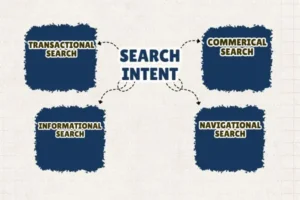
Search intent is basically the “why” behind someone’s Google search. What are they hoping to find? That’s the real question. Google wants to serve up the results that actually help people get what they’re after — so if your page doesn’t really match what they want, all the keyword tricks in the world won’t save your rankings.
Take a search like “SEO checklist.” People searching for that are looking for a straightforward list — something clear and actionable. If someone types in “SEO tools,” they’re probably after recommendations or maybe a side-by-side comparison. And “How does SEO work?” — that’s someone wanting a deeper explanation. You can’t just shove the same kind of content at each query. You have to actually deliver what folks want.
So, why does search intent matter for rankings? Google watches how people use its search results. If someone clicks and bounces right away because your page doesn’t answer their question, Google notices — and your ranking takes a hit. Nailing search intent is usually more important than obsessing about keywords. When your content truly answers the user’s need, people stick around longer, interact more, and your rankings climb.
How do you figure out search intent? Honestly, just Google the keyword yourself. Look at what’s ranking at the top — are they blogs, product pages, or how-to guides? Is the content super detailed or quick and direct? Think about who those pages are written for: beginners or experts? The style of the top results tells you a lot about what Google thinks people want.
Once you get the intent, build your content to match. If Google’s rewarding long, newbie-friendly guides, don’t try to rank with a two-paragraph explainer. If it’s all product pages, skip the educational blog. Make your page look and feel like what’s already working — match the format, depth, and tone. That’s how you not only rank higher but actually help people get what they’re searching for.
Types OF SEO
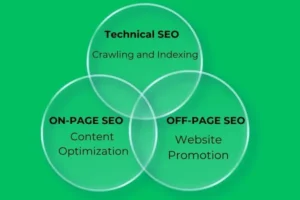
On Page SEO
-
Content
When people visit your website, they’re looking for something—text, videos, images, or maybe just some straightforward information. That’s your content. If your content’s helpful, original, and easy to read, people will stick around longer. And hey, that’s good not only for them but also for you, because search engines like Google notice when folks spend time on your site. In the end, the better your content, the better shot you have at showing up near the top of the search results.
Keywords
Think about the questions or phrases people type into Google. Those are keywords. You want to weave the right ones into your content, so search engines catch on to what your page is about. Let’s say you own a bakery—words like “best bakery near me” or “fresh cakes in [city]” make sense. The trick is to use keywords naturally. Stuffing them everywhere just trips you up. Make them part of your stories and descriptions, and your rankings will thank you.
Headings
Headings split up your page so people don’t get lost. They also guide search engines through your content. This is where the H1, H2, and H3 tags come in. H1 is your main title—front and center. H2 breaks things into main sections, and H3 dives deeper with sub-sections. Clear headings keep everything organized and easy to scan.
Internal Links
Internal links are connectors. Maybe you reference a blog post you wrote last month or a service page deeper in your site. These links help visitors find more of what you offer. Plus, they show search engines how your site fits together. Link thoughtfully, and you’ll help both people and rankings.
Images
Great images make your site pop. Use sharp, relevant photos, and don’t forget the behind-the-scenes details: give each image alt text (so search engines know what’s in the picture), use straightforward file names, and shrink file sizes to help your pages load fast. When your images are on point, both your users and Google will notice.
-
Meta Tag
Meta tags might not be visible to your regular visitors, but search engines read them closely. Your meta title is what shows up in Google’s results, and the meta description sits right under it as a quick summary. “Meta keywords” used to matter, but not so much anymore—focus on solid titles and descriptions. Good meta tags help you stand out before anyone even lands on your page.
Off-Page SEO
Off-page SEO is all the work you do outside your own website to help it build a strong reputation and climb up in search rankings. Basically, you’re sending Google the message: “People trust this site.”
Backlinks are the main star here. Each time another website links to yours, it’s like a public thumbs-up. When respected sites give you those links, search engines start to view you as more trustworthy, and that usually bumps you up in the rankings.
Authority ties it all together. If people see your website as reliable and experts link to you, mention you, or talk about you, you look credible—kind of like being the go-to person in your industry.
OFF Page SEO Backlinks
So, in the end, off-page SEO is really about earning trust wherever you can, and backlinks matter most. When well-known sites link to you, Google pays attention, sees your content as valuable, and moves you up in the search results.
Why Backlinks Matter
Think of backlinks as votes people cast for your website. When respected sites link to your pages, they’re basically telling search engines, “Hey, this content’s worth checking out.” But here’s the thing—not all votes are the same. A handful of strong, relevant backlinks will always beat a pile of random, low-quality ones.
What Makes a Good Backlink?
A solid backlink comes from a site that fits your niche. It’s not just about boosting SEO—real traffic should come through, too. The link sits naturally in the content and makes sense for the reader, not hidden away or awkwardly shoved in. The best ones? Editorial links. Someone actually found your content valuable and decided to share it, not because they got paid or because it’s part of some spammy scheme.
Beginner-Friendly Link Building Ideas
If you’re just starting out, keep it simple and play fair. Guest blogging is a great first step—write something useful for another website and get a backlink for your effort. Answer questions on forums or platforms in your area of expertise and you’ll build authority while attracting genuine links. Creating guides, lists, or helpful tools also makes other sites want to reference your work. And don’t forget about connecting with other people in your field. A quick email or friendly chat can turn into opportunities you didn’t even expect.
Watch Out for Spammy Links
Buying backlinks or using shady tactics is asking for trouble. Google’s pretty sharp at spotting fake or forced links, and if they catch you, your site could plummet in search results. It’s much safer—and smarter—to focus on links that are actually relevant and earned.
Measuring SEO Success
SEO doesn’t work overnight. You’ve got to let things build up. So what should you watch? Keep an eye on impressions, clicks, average position, how much organic traffic you’re getting, and which pages are indexed.
Common Beginner Mistakes
Don’t expect instant wins. Chasing super competitive keywords, ignoring what searchers really want, putting out thin or shallow content, or forgetting to freshen up old posts—these things hold you back. Focus on quality and a strategy that makes sense, and you’ll start to see progress.
SEO Tools Beginners Should Use
SEO tools help beginners understand how their website is performing and where improvements are needed. These tools make SEO easier by providing data about traffic, keywords, site health, and performance. Starting with the right tools allows beginners to build a strong SEO foundation without feeling overwhelmed.
Essential Free Tools
Google Search Console’s one of those tools you can’t skip if you want to understand how your site shows up in Google search. It lets you see the keywords driving traffic, checks your indexing status, flags crawl errors, and tracks how you’re performing. Basically, you use it to keep an eye on rankings and fix anything technical that gets in the way.
Google Analytics answers the big questions about your website visitors. You can see where they come from, what they do on your site, which pages get the most views, and how long people actually stick around.
Optional Paid Tools
Ahrefs is a favorite for people serious about SEO. It digs deep into backlinks, keyword research, and how your competitors are doing. If you want to know why others rank higher and how to change that, this tool gets you there.
SEMrush is a huge SEO platform that covers everything from keyword research to site audits, checking out the competition, and optimizing your content. If you’re building a full-scale SEO strategy, SEMrush helps you manage it all.
Ubersuggest keeps things simple and budget-friendly. It’s great for beginners, offering keyword ideas, SEO audits, and tips for content. If you’re just starting out and don’t want to overspend, it’s a solid way to get useful insights without feeling overwhelmed.

