
What Is a Noindex Tag? A Beginner’s Guide to SEO Control
If you want better control over which pages appear in search results, the noindex tag is one of the most powerful SEO tools you can use. It tells search engines not to include a specific page in their index — meaning the page won’t show up in search results.
What Is a Noindex Tag?
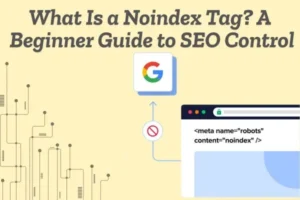
A noindex tag is a directive that tells search engines like Google not to index a particular webpage. When a page is not indexed, it cannot appear in search results.
Unlike robots.txt (which blocks crawling), the noindex tag allows search engines to crawl the page but prevents it from being stored in their index.
How Does a Noindex Tag Work?
When search engine bots visit your page, they read the HTML code. If they find a noindex tag, they understand that the page should not be added to the search database.
Here’s how it looks in HTML:
<meta name=”robots” content=”noindex”>
You can also use it in HTTP headers for non-HTML files like PDFs.
Why Is the Noindex Tag Important for SEO?
Using noindex helps you:
- Prevent low-quality pages from appearing in search results
- Avoid duplicate content issues
- Improve overall website quality signals
- Focus crawl budget on important pages
Search engines evaluate your site’s quality based on what they index. Removing unnecessary pages helps maintain a clean SEO structure.
When Should You Use a Noindex Tag?
Here are common situations where noindex is helpful:
- Thank-you pages
- Admin or login pages
- Duplicate content pages
- Filter and search result pages
- Thin or low-value content
Noindex How It Affects Your Website’s Visibility
The noindex tag is an SEO instruction that tells search engines not to show a specific page in search results. When search engines like Google see this tag, they remove (or don’t add) that page to their index.Simply put, if a page has noindex, it will not appear in Google search results.
The Page Disappears from Search Results If a page is marked as noindex, users cannot find it through search engines. Even if the content is good, it won’t rank.
Traffic May Decrease Since the page is hidden from search results, it will not receive organic traffic from Google.
Better Focus on Important Pages Using noindex on low-value pages helps search engines focus on your important content. This can improve overall website quality.
When Is Noindex a Good Idea?
You should use noindex for:
- Thank-you pages
- Login or admin pages
- Duplicate content
- Thin or low-quality pages
This keeps your website clean and SEO-friendly.
When Should You Avoid Noindex?
Never use noindex on:
- Homepage
- Important blog posts
- Product or service pages
- Landing pages you want to rank
How to Check Noindex Status You can check whether a page is noindexed using the URL Inspection tool in Google Search Console.
Noindex vs Nofollow: Understanding the Key SEO Differences
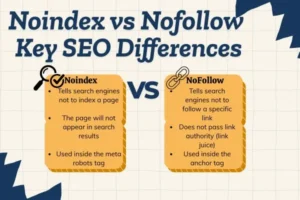
In technical SEO, noindex and nofollow are control signals that guide search engines on how to treat your content. Even though both are related to search engine behavior, they influence completely different aspects of your website.
Let’s break it down in a clearer and more practical way.
Noindex
Noindex is used when you want to stop a complete page from appearing in search engine results. When you add a noindex tag, search engines like Google can still visit and read the page, but they will not show it in search listings.
For example, imagine you have a Thank You page that users see after submitting a form. You don’t want this page to appear in search results because it has no SEO value. In this case, you use the noindex tag.
Code Example:
<head>
<meta name=”robots” content=”noindex”>
</head>
This code is placed inside the <head> section of your webpage. After adding this, the page will not be indexed or shown in search results.
Another example:
If you have a duplicate product page, adding noindex prevents duplicate content issues while still allowing users to access the page directly.
Nofollow
Nofollow is different because it controls link authority, not page visibility. It tells search engines not to pass ranking power to a specific link.
For example, if you are linking to a sponsored website or an affiliate product, you should not pass SEO value to that site. In this situation, you use nofollow.
Code Example:
<a href=”https://example.com” rel=”nofollow”>Visit Website</a>
Here, the link will still work for users, but search engines will not transfer link authority to that website.
Another example:
If users post links in your blog comments, you can add rel=”nofollow” to those links to prevent spam websites from gaining SEO benefit.
Simple Difference in One Line
- Noindex = Hides the entire page from search results.
- Nofollow = Stops SEO value from passing through a link.
When and Why You Should Use the Noindex Meta Tag
The noindex meta tag is used to stop a webpage from appearing in search engine results. When you add this tag, search engines like Google can still visit the page, but they will not show it in search listings.
When You Should Use Noindex
You should use noindex in simple situations such as:
- Thank you pages after form submission
- Login or admin pages
- Duplicate pages with similar content
- Thin content pages with very little value
- Temporary pages made for short campaigns
Why You Should Use Noindex
- To keep unnecessary pages out of search results
- To avoid duplicate content problems
- To improve overall site quality
- To help search engines focus on important pages
Example Code
<meta name=”robots” content=”noindex”>
This small line of code is added inside the <head> section of your webpage.
In short, use noindex when a page is not meant to rank or does not provide SEO value.
How the Noindex Tag Impacts Google Rankings
The noindex tag has a direct and powerful impact on how your website performs in search results. When you apply a noindex meta tag to a page, search engines like Google are instructed not to include that page in their search index. As a result, the page becomes completely ineligible to rank for any keywords. No matter how optimized the content is, it will not appear in Google’s search results because it has been intentionally excluded.
It Completely Removes a Page from Ranking
One of the most important effects of the noindex tag is that it fully removes a page from Google’s ranking system. If a page was previously ranking and you add noindex to it, Google will eventually drop it from search results after crawling it again. This means all keyword visibility, impressions, and potential traffic from that page will stop. Because of this, the noindex tag must be used carefully and only on pages that are not meant to attract organic traffic.
It Can Improve Overall Website SEO
Although noindex removes individual pages from ranking, it can positively impact your overall SEO strategy when used correctly. Websites often contain low-value pages such as thin content, duplicate URLs, tag pages, filtered category pages, or temporary campaign pages. If these pages remain indexed, they may weaken your site’s overall quality signals. By removing unnecessary pages from Google’s index, you help search engines focus on your most important and high-quality content. This can strengthen the authority and ranking potential of your core pages.
It Helps Manage Duplicate Content Issues
Duplicate content can confuse search engines because multiple pages may compete for the same keywords. When Google sees similar content across different URLs, it may struggle to decide which version should rank. By applying noindex to the less important or duplicate versions, you reduce this confusion. This allows your preferred page to perform better in search results without internal competition.
It Affects Organic Traffic and Visibility
Since noindex prevents a page from appearing in search results, it also stops organic traffic from coming to that page through Google. This is why it should never be added to important landing pages, blog posts, product pages, or service pages that are meant to rank. A small mistake—such as accidentally adding noindex to a key page—can cause a sudden drop in traffic and keyword rankings.
It Does Not Automatically Stop Crawling
It is important to understand that noindex does not block crawling by default. Google can still access and read the page unless it is blocked through robots.txt. The tag only controls indexing, not crawling. This means search engines may still analyze the content and follow links on the page unless additional restrictions are applied.
Strategic Use Is Important
The impact of the noindex tag depends entirely on how it is used. When applied strategically, it helps clean up your indexed pages, improve content quality signals, and prevent duplicate issues. However, if used incorrectly, it can remove valuable pages from search results and harm your rankings.
Common Noindex Mistakes That Remove Pages from Search Results
The noindex tag is a powerful SEO tool, but small mistakes can cause important pages to disappear from search results. Search engines like Google strictly follow this directive, so even one wrong implementation can remove valuable pages from rankings. Below are the most common noindex mistakes website owners make.

Adding Noindex to Important Pages One of the biggest mistakes is accidentally placing the noindex tag on key pages such as homepage, service pages, product pages, or blog posts. Once Google crawls the page and detects the tag, it will remove that page from search results. This can cause sudden drops in traffic and keyword rankings.
Leaving Noindex After Website Launch Many developers add noindex during website development to prevent search engines from indexing a staging site. However, forgetting to remove it after the site goes live is a common and serious issue. As a result, the entire website may remain invisible in search results.
Blocking the Page in Robots.txt Another mistake is blocking a page in robots.txt while also adding a noindex tag. If Google cannot crawl the page, it may not see the noindex tag. This creates confusion and can lead to indexing problems. Proper implementation requires allowing crawling so search engines can detect the noindex instruction.
Using Noindex Instead of Canonical Sometimes website owners use noindex on duplicate pages when a canonical tag would be a better solution. Noindex removes the page completely from search results, while canonical helps consolidate ranking signals to the preferred version. Using the wrong method can weaken SEO strategy.
Applying Noindex to Paginated or Category Pages Some websites mistakenly add noindex to category or pagination pages that help users navigate content. Removing these pages from search results can reduce visibility and limit keyword opportunities.
Not Monitoring in Search Console Failing to regularly check indexing status in tools like Google Search Console can allow noindex errors to go unnoticed. Important pages might be removed from search results without the website owner realizing it.
Understanding the Noindex Tag The noindex tag is a meta directive that tells search engines not to show a specific page in search results. When search engines like Google crawl a page and see this tag, they remove it from their index. This means the page cannot rank for any keywords until the tag is removed.
How to Add a Noindex Tag Properly
To add a noindex tag, you need to place it inside the <head> section of your webpage’s HTML. The correct code is <meta name=”robots” content=”noindex”>. Once added, save and publish the page. After Google crawls it again, the page will gradually disappear from search results. If you are using a CMS, many SEO plugins allow you to enable noindex without editing code manually.
How to Remove a Noindex Tag Safely
If you want the page to appear again in search results, simply remove the noindex meta tag from the <head> section and update the page. After removing it, make sure the page is not blocked in robots.txt and is accessible to search engines. You can then request indexing through Google Search Console to speed up the process.
Important Things to Check
After adding or removing the noindex tag, always verify your changes. Make sure you did not accidentally apply it to important pages like your homepage or service pages. Regular monitoring ensures that valuable content remains visible while unnecessary pages stay out of search results.
The Role of Noindex in Technical SEO Strategy
The noindex tag plays an important role in technical SEO by controlling which pages search engines are allowed to show in search results. Search engines like Google use this directive to understand whether a page should be included in their index or excluded. In simple terms, noindex helps website owners decide which content deserves visibility and which does not.

Controlling Search Visibility
One of the main roles of noindex in a technical SEO strategy is managing search visibility. Not every page on a website is meant to rank. Pages such as thank you pages, login sections, filtered URLs, or internal search results may be useful for users but unnecessary in search results. By applying noindex to such pages, you keep your indexed content clean and focused on high-value pages.
Improving Crawl Efficiency
Search engines have limited crawl resources, often referred to as crawl budget. If too many low-quality or duplicate pages are indexed, search engines may spend time on those instead of your important content. Using noindex strategically ensures that crawlers focus on your priority pages, which can improve indexing efficiency and overall site performance.
Managing Duplicate and Thin Content Duplicate or thin content can weaken your SEO signals. When multiple similar pages compete in search results, it can confuse search engines and reduce ranking potential. Noindex helps remove less important versions from the index, allowing your main pages to perform better without internal competition.
Supporting a Clean Site Structure
A strong technical SEO strategy requires a well-organized and controlled site structure. The noindex tag supports this by keeping unnecessary pages out of search results while maintaining accessibility for users. This balance improves content quality signals and strengthens your website’s overall authority.
Strategic Use Is Essential The noindex tag is powerful, but it must be used carefully. Adding it to important pages can remove them from search results and cause traffic loss. When applied correctly as part of a technical SEO plan, noindex helps maintain a focused, high-quality, and optimized website structure.
Why Your Page Disappeared: Hidden Noindex Issues Explained
If your page suddenly disappeared from search results, one of the most common reasons is a hidden noindex tag. Search engines like Google strictly follow this directive. If a page contains a noindex instruction, Google will remove it from its index, which means the page can no longer rank or appear in search listings.
Accidental Noindex in the Page Code
Sometimes, a noindex tag is accidentally added inside the <head> section of a webpage. This can happen during development, redesign, or plugin updates. Even a small line like <meta name=”robots” content=”noindex”> is enough to completely remove the page from search results once Google crawls it again.
Noindex Added by an SEO Plugin
Many CMS platforms allow noindex settings through SEO plugins. A page might be set to “noindex” without you realizing it. This is common when editing advanced SEO settings or duplicating pages. If the setting remains active, the page will stay invisible in search results.
Noindex on Staging Sites That Was Not Removed During website development, developers often add noindex to prevent search engines from indexing a test or staging version. However, if the same setting is pushed to the live site and not removed, important pages may disappear from Google.
Conflicts with Robots.txt In some cases, a page is blocked in robots.txt while also containing a noindex tag. If Google cannot crawl the page properly, it may not process the noindex correctly, leading to unexpected indexing behavior. Technical conflicts like this can cause confusion about why a page is missing.
Delayed Crawling and Reindexing
After adding or removing a noindex tag, it takes time for Google to crawl the page again. If you recently changed settings, the disappearance might be temporary until Google updates its index. Checking the page status in Google Search Console can help confirm the issue.
Smart Ways to Use Noindex Without Hurting Your SEO
The noindex tag is a powerful SEO tool, but it must be used carefully. When applied strategically, it improves site quality and structure. However, if used incorrectly, it can remove important pages from search results in Google. The key is to use noindex in a smart and controlled way.

Use Noindex Only on Low-Value Pages
One smart approach is to apply noindex only to pages that do not provide SEO value. These include thank-you pages, login pages, internal search results, filtered URLs, or temporary campaign pages. These pages are useful for users but are not meant to rank in search engines.
Avoid Adding Noindex to Important Pages
Never apply noindex to high-priority pages like your homepage, service pages, product pages, or main blog posts. Before publishing changes, always double-check that the noindex tag has not been accidentally added to key content. A small mistake can cause a sudden drop in rankings and traffic.
Use Noindex for Thin or Duplicate Content Carefully If your website has thin or duplicate pages, noindex can help clean up your index. However, make sure you are not removing pages that still have ranking potential. In some cases, improving the content or using a canonical tag may be a better solution than removing the page completely.
Monitor Your Indexing Regularly Smart SEO practice includes regular monitoring. Use tools like Google Search Console to check which pages are indexed and whether any important pages are marked as “Excluded by noindex.” This helps you quickly detect and fix mistakes before they impact traffic.
Combine Strategy with Crawl Management Noindex works best when combined with a clear technical SEO strategy. Make sure important pages are easily crawlable and internally linked. Remove unnecessary pages from the index while strengthening valuable content. This balance keeps your site organized and focused.

