

Image SEO Optimization: Alt Text + Compression + WebP
Introduction
In the world of digital marketing and website optimisation, images play a crucial role in attracting and engaging users. However, image SEO optimization can also affect website performance, load speed, and SEO if not optimised properly. Image SEO Optimization is the process of improving images on a website to enhance visibility on search engines, reduce load times, and improve user experience. The main techniques include Alt Text, Image Compression, and WebP format, which together contribute to better performance, accessibility, and search engine rankings.
This article explores image SEO optimisation in detail, covering how to write effective Alt Text, compress images without losing quality, and use the WebP format for faster loading times and better SEO performance.

1. What is Image SEO?
Image SEO refers to the strategies used to optimize images on a website so that they can be easily discovered and indexed by search engines like Google. Optimised images help improve organic traffic, page load speed, and user experience, all of which are critical factors for SEO.
Images that are not optimized can cause slow page speed, poor accessibility, and missed opportunities to rank in Google Image Search.
Key points:
-
Improves website visibility in image searches
-
Enhances page load speed
-
Increases organic traffic
-
Improves user engagement and accessibility
2. Why Image SEO is Important
Images are not just decorative; they carry significant SEO value. Search engines use various factors to rank pages, and images contribute to these factors in several ways:
Benefits of Image SEO:
-
Better Ranking in Search Engines: Optimised images help pages appear in Google Image search results.
-
Faster Website Loading: Proper compression reduces file size, improving page speed, which is a ranking factor.
-
Enhanced User Experience: Clear, fast-loading images engage users and reduce bounce rates.
-
Accessibility: Alt Text allows visually impaired users to understand image content.
-
Traffic from Image Search: Well-optimised images can bring traffic independent of the main content.
3. Alt Text: The Foundation of Image SEO
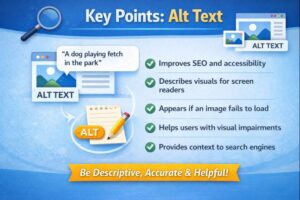
Alt Text (Alternative Text) is a descriptive text attribute added to images in HTML. It describes what the image is about. Alt Text is important for both SEO and accessibility.
Example in HTML:
Why Alt Text Matters
Alt Text serves three main purposes:
-
Accessibility: Screen readers use Alt Text to describe images to visually impaired users.
-
SEO: Search engines cannot “see” images, so they rely on Alt Text to understand the content.
-
Fallback Content: If an image fails to load, Alt Text is displayed, providing context.
How to Write Effective Alt Text
-
Be descriptive but concise (usually 5–15 words).
-
Include relevant keywords naturally.
-
Avoid keyword stuffing.
-
Describe the function or content of the image, not just the object.
-
Use different Alt Text for each image to avoid duplication.
Example:
Bad Alt Text: <img src="dog.jpg" alt="dog">
Good Alt Text: <img src="dog.jpg" alt="Golden Retriever playing in the park">
Key Points: Alt Text
-
Helps visually impaired users
-
Provides context for search engines
-
Boosts SEO ranking
-
Improves accessibility
-
Must be descriptive, concise, and unique
4. Image Compression: Reducing File Size for Speed
What is Image Compression?
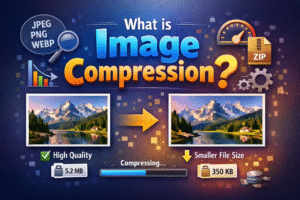
Image compression is the process of reducing the file size of an image without significantly affecting its quality. Large images can slow down a website, negatively impacting page speed and SEO.
Why Compression Matters
-
Page speed is a ranking factor for SEO.
-
Faster loading websites improve user experience and reduce bounce rates.
-
Smaller images save bandwidth, which is important for mobile users.
Types of Compression
-
Lossless Compression: Reduces file size without losing image quality.
-
Lossy Compression: Reduces file size by slightly reducing image quality. Best for web images where minor quality loss is acceptable.
Tools for Image Compression
-
TinyPNG / TinyJPG – Simple online tool for PNG/JPG compression.
-
ImageOptim—A Mac tool for batch image compression.
-
ShortPixel—a WordPress plugin for automatic image compression.
-
Squoosh—Browser-based image compression tool.
Key Points: Image Compression
-
Reduces file size without major quality loss
-
Improves website load speed
-
Enhances user experience
-
Supports SEO by improving Core Web Vitals
-
Use tools like TinyPNG, ShortPixel, or Squoosh
5. WebP Format: The Next-Gen Image Standard
What is WebP?
WebP is a modern image format developed by Google that provides better compression than traditional formats like JPEG and PNG. WebP images are usually 25–35% smaller while maintaining the same quality.
Benefits of WebP:
-
Smaller file sizes = faster loading
-
Supports transparency like PNG
-
Supports animation like GIF
-
Fully compatible with most modern browsers
How to Convert Images to WebP
-
Using Photoshop/Illustrator: Export images in WebP format.
-
Online Tools: Squoosh, Convertio, EZGIF.
-
WordPress Plugins: WebP Express, ShortPixel, Imagify.
Key Points: WebP
-
Smaller file size = faster page speed
-
Maintains high-quality images
-
Supports transparency and animation
-
Recommended for modern websites
-
Helps boost SEO and user experience
6. Combining Alt Text, Compression, and WebP for Maximum SEO Impact
Best Practices
-
Add descriptive Alt Text with relevant keywords.
-
Compress images to reduce load time while keeping quality.
-
Use WebP format for modern browsers to save bandwidth.
-
Ensure images are responsive (mobile-friendly).
-
Keep filenames descriptive and SEO-friendly (e.g.).
Example Workflow:
-
Create image → 2. Compress → 3. Convert to WebP → 4. Add Alt Text → 5. Upload to the website
Benefits of Combined Optimization
-
Faster page load speed → improves Core Web Vitals
-
Better SEO ranking → images contribute to Google search visibility
-
Improved user engagement → users stay longer on the site
-
Increased organic traffic → from both the website and Google Image search
7 Common Image SEO Mistakes to Avoid
-
Using generic Alt Text (e.g., “image1.jpg”).
-
Uploading large uncompressed images
-
Ignoring mobile optimization
-
Not using descriptive filenames
-
Using outdated formats instead of WebP
8. Tools to Help with Image SEO
-
Yoast SEO / Rank Math—for alt text recommendations and image optimization.
-
TinyPNG / ShortPixel / Squoosh—For compression and WebP conversion.
-
Google PageSpeed Insights—to check image performance impact on page speed.
Conclusion
Image SEO Optimization is an essential part of modern website management. Using Alt Text, Image Compression, and WebP format together improves website speed, user experience, and search engine visibility. Properly optimized images attract more traffic, improve click-through rates, and enhance overall SEO performance. Websites that follow these practices gain a competitive edge in both organic search rankings and user engagement.
