The Complete Guide to Identifying and Fixing Duplicate Content Errors
Understanding Duplicate Content Errors
Duplicate content errors happen when identical or very similar content exists on more than one URL. Instead of rewarding multiple versions, search engines such as Google typically choose just one version to display in search results. If the wrong page is selected, your important content may lose visibility.

How to Spot Duplicate Content on Your Website Identifying duplication starts with reviewing how your pages are indexed. You can check coverage and indexing reports inside Google Search Console to see which URLs are marked as duplicates. SEO crawling tools like Screaming Frog SEO Spider help detect repeated titles, meta descriptions, and content blocks across your site. Even manually checking URL structures can reveal technical duplication.
Why Duplicate Content Happens
Most duplicate errors are caused by technical configurations. Multiple URL versions (HTTP vs HTTPS), tracking parameters, filter pages, and session IDs can automatically create duplicate URLs. Content duplication can also occur when similar articles target the same keyword or when product descriptions are reused without modification.
Effective Ways to Fix the Problem To correct duplicate content, clearly define a preferred version of each page using canonical tags. If extra versions are unnecessary, set up 301 redirects to merge them into one main URL. For pages that should not appear in search results, apply a noindex tag. These steps help consolidate ranking signals and improve SEO clarity.
Preventing Duplicate Issues in the Future Long-term prevention requires maintaining a consistent URL structure and publishing unique, valuable content. Regular site audits and careful keyword planning ensure that multiple pages do not compete for the same search intent. By staying proactive, you can protect your rankings and maintain strong search performance.
Why Duplicate Content Hurts SEO (And How to Solve It Fast)
The Real Problem with Duplicate Content
Duplicate content might seem harmless, but it quietly damages your SEO performance. When the same content appears on multiple URLs, search engines like Google must choose which version deserves to rank. This confusion weakens your website’s overall authority.
How It Affects Your Rankings
Instead of boosting one strong page, duplicate content spreads ranking signals across several similar pages. Backlinks, relevance, and authority get divided. In many cases, search engines may rank the wrong page — or filter duplicates out completely. This leads to lower visibility and reduced organic traffic.
Another hidden issue is crawl efficiency. When search engines spend time crawling duplicate pages, they may ignore more important content on your website.
Quick and Practical Fixes The fastest way to solve duplicate content is to clearly define one main version of each page. You can do this by adding canonical tags. If extra versions are unnecessary, use 301 redirects to combine them into a single URL. For pages that shouldn’t appear in search results, apply a noindex tag.
It’s also important to monitor your site regularly using tools like Google Search Console to catch issues early.
Internal vs External Duplicate Content: SEO Fix Strategies That Work
Understanding the Difference
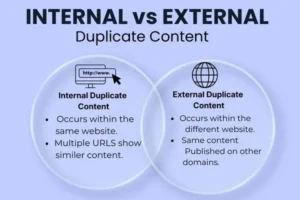
Duplicate content can be divided into two main types: internal and external. Both can affect your website’s performance in search engines like Google, but they occur for different reasons and require slightly different solutions.
What Is Internal Duplicate Content?
Internal duplicate content happens within your own website. This means the same or very similar content appears on multiple URLs of the same domain.
Common causes include:
How to Fix Internal Duplicate Content
The most effective strategies include:
-
Adding canonical tags to define the main page
-
Using 301 redirects to merge duplicate URLs
-
Applying noindex to low-value pages
-
Maintaining consistent internal linking
These steps help consolidate ranking signals and improve crawl efficiency.
What Is External Duplicate Content?
External duplicate content occurs when your content appears on other websites, or when you publish content that already exists elsewhere. This often happens with:
How to Fix External Duplicate Content
To handle external duplication:
-
Publish original and unique content
-
Request canonical attribution when syndicating content
-
Rewrite manufacturer descriptions
-
Monitor copied content using SEO tools
You can track indexing and duplication issues inside Google Search Console.
Which Is More Dangerous?
Internal duplicate content is easier to control because it’s within your website. External duplication can be harder to manage, especially if other sites copy your content. However, both types can split ranking signals and reduce visibility if not handled properly.
How to Use Canonical Tags to Resolve Duplicate Content Problems
The Purpose of Canonical Tags
Canonical tags act as a signal to search engines, telling them which version of a page should be treated as the primary one. When several URLs contain similar or identical content, search engines like Google may struggle to decide which page deserves to rank. A canonical tag removes that confusion by clearly pointing to the preferred URL.
Why Duplicate Pages Need Canonicalization
Duplicate pages often compete with each other in search results. This competition divides ranking signals such as backlinks and relevance. Instead of strengthening one page, SEO value gets spread across multiple URLs. By setting a canonical tag, you consolidate that value into a single, authoritative page.
Situations Where Canonical Tags Work Best Canonical tags are especially helpful for e-commerce websites with product variations, blog posts accessible through multiple categories, and URLs with tracking parameters. They are also useful when similar content must exist for user experience reasons but should not compete in search rankings.
How Canonical Tags Function A canonical tag is placed in the head section of a webpage’s HTML. It references the URL that should be considered the original version. Once implemented, search engines recognize this signal and prioritize the specified page for indexing and ranking.
Smart Implementation Tips
Make sure the canonical URL is correct, active, and not blocked from indexing. Use consistent internal linking that matches the canonical version. Regularly check for errors using tools like Google Search Console to ensure search engines are interpreting your tags properly.
Recovering from Duplicate Content Penalties: Proven SEO Techniques
Duplicate content rarely leads to a direct manual penalty, but it can cause ranking drops when search engines like Google filter similar pages from results. If your traffic suddenly declines, duplicate URLs or repeated content may be weakening your SEO signals.

Identify the Source of Duplication
Start by checking indexed pages and coverage reports inside Google Search Console. Look for warnings such as “Duplicate without user-selected canonical” or “Alternate page with canonical tag.” SEO crawling tools can also reveal duplicate titles, meta descriptions, and similar content blocks.
Consolidate Duplicate URLs
If multiple URLs show the same content, combine them. Use 301 redirects to permanently point duplicate pages to the main version. This transfers ranking signals and prevents internal competition between similar pages.
Implement Canonical Tags Correctly When duplicate pages must exist (for example, product variations), add canonical tags to indicate the preferred URL. This ensures search engines understand which page should receive ranking credit.
Improve or Rewrite Thin Content If duplication is caused by similar blog posts or reused product descriptions, merge the content into one comprehensive page or rewrite it to make it unique and valuable. High-quality original content helps rebuild authority.
Remove or Noindex Low-Value Pages Apply a noindex tag to pages that do not need to appear in search results, such as filter pages or internal search results. This reduces clutter and helps search engines focus on important pages.
Monitor Recovery Progress
After fixing duplicate issues, monitor indexing and rankings regularly. Recovery may take time as search engines re-crawl and re-evaluate your site. Consistent monitoring ensures that duplicate problems do not return.
Step-by-Step Guide to Finding and Removing Duplicate Pages
Check Indexed Pages
Start by reviewing which pages are indexed by search engines. Open Google Search Console and go to the Pages/Indexing report. Look for warnings such as “Duplicate without user-selected canonical” or “Alternate page with proper canonical tag.” This helps you quickly spot duplication issues.
Crawl Your Website
Use an SEO crawler like Screaming Frog SEO Spider to scan your entire website. The tool will highlight duplicate URLs, titles, meta descriptions, and similar content. This gives you a clear overview of internal duplication problems.
Identify the Cause
After finding duplicate pages, determine why they exist. Common causes include:
Understanding the cause helps you choose the right fix.
Choose the Correct Fix
Now decide how to remove or manage duplicates:
-
Use 301 redirects to permanently merge duplicate pages.
-
Add a canonical tag to define the main version when multiple pages must exist.
-
Apply noindex to low-value pages that shouldn’t appear in search results.
This step consolidates ranking signals and prevents internal competition.
Update Internal Links
Make sure all internal links point to the preferred (canonical) URL version. Avoid linking to parameter-based or outdated URLs. This strengthens SEO consistency.
Monitor and Recheck
After implementing fixes, monitor indexing and performance inside Google Search Console. It may take time for search engines to recrawl and update your site, so check regularly to ensure duplicates are resolved.
Duplicate URLs, Parameters & Pagination: Advanced SEO Fixes
Duplicate URLs often appear due to technical configurations rather than intentional content copying. Search engines like Google may treat each URL as a separate page, even if the content is nearly identical. This creates confusion, splits ranking signals, and weakens SEO performance.

URL Parameters: Why They Create Duplication
URL parameters are commonly used for filtering, sorting, tracking, and session IDs. For example:
-
?sort=price
-
?color=black
-
?utm_source=campaign
Although the core content may remain the same, these variations generate multiple URLs. Search engines might crawl and index each version, leading to duplicate content issues.
Advanced Fix
Use canonical tags pointing to the main version of the page. Ensure internal links always direct to the clean, parameter-free URL. Regularly monitor parameter behavior in Google Search Console to control indexing.
Pagination: Managing Multi-Page Content Correctly
Pagination occurs when content is split across multiple pages, such as category listings or blog archives (Page 1, Page 2, Page 3). Poor pagination setup can cause title duplication and thin content issues.
Advanced Fix
Each paginated page should have:
-
A unique title and meta description
-
Self-referencing canonical tags
-
Proper internal linking structure
Avoid canonicalizing all paginated pages to Page 1 unless the content is truly identical.
Consolidating Duplicate URL Versions
Technical duplication also happens due to:
Advanced Fix
Implement 301 redirects to enforce one preferred domain version. This consolidates authority and prevents duplicate indexing.
Strengthening Crawl Efficiency
Duplicate URLs waste crawl budget and reduce indexing efficiency. By controlling parameters, optimizing pagination, and enforcing clean URL structures, you help search engines focus on valuable pages rather than repeated content.
Best Technical SEO Practices to Prevent Duplicate Content in 2026
Always choose one preferred domain version (HTTPS recommended). Redirect HTTP to HTTPS and decide between www or non-www. Search engines like Google treat different versions as separate URLs, so 301 redirects help consolidate authority.
Use Self-Referencing Canonical Tags
Every important page should have a self-referencing canonical tag. This clearly tells search engines which URL is the original version and prevents confusion caused by parameters or minor URL variations.
Control URL Parameters Properly
Filtering, sorting, and tracking parameters often create duplicate URLs. Keep internal links clean (without unnecessary parameters) and monitor indexing behavior in Google Search Console to prevent parameter-based duplication.
Optimize Pagination Structure For paginated content (category pages, blog archives), ensure each page has a unique title and self-canonical tag. Avoid pointing all pages to Page 1 unless the content is identical.
Improve Internal Linking Consistency
Always link to the preferred URL format. Avoid mixing trailing slashes, uppercase/lowercase variations, or parameter-based links. Consistent linking strengthens SEO clarity.
Manage Faceted Navigation CarefullyE-commerce websites with filters (color, size, price) can generate thousands of duplicate URLs. Use canonical tags or noindex for low-value filtered pages to protect crawl budget.
Maintain a Clean XML Sitemap Your sitemap should include only canonical, indexable URLs. Remove duplicate, redirected, or noindex pages to help search engines focus on valuable content.
Conduct Regular Technical Audits Use crawling tools to detect duplicate titles, meta descriptions, and content blocks. Regular audits ensure issues are caught early before they affect rankings.