
Why Your Page Shows “Discovered – Currently Not Indexed”
When you see “Discovered – Currently Not Indexed” inside Google Search Console, it means Google has found your page URL but has not visited it yet. Since Google has not crawled the page, it has not added it to its search index.
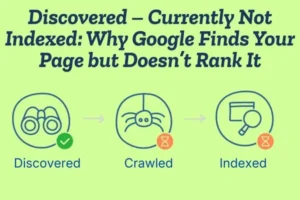
If a page is not indexed, it cannot appear in Google search results. This means no rankings and no organic traffic from that page.
Why Google Finds the Page but Doesn’t Index It
This usually happens when Google is managing its crawling resources. Google does not crawl every page immediately. If your website is new, has many pages, or does not have strong authority, Google may take time to crawl it.
Sometimes the content may be too short or not detailed enough. If Google thinks the page does not offer strong value, it may delay crawling. Weak internal linking can also be a reason. If your page is not connected properly with other important pages, Google may not treat it as a priority.
How This Affects Your SEO Performance
From an SEO point of view, indexing is the first step to ranking. Even if you use the right keywords and optimize your page, it will not rank until Google indexes it.
That is why this issue should be fixed quickly. The faster your page gets indexed, the sooner it can start appearing in search results.
How to Fix the “Discovered – Currently Not Indexed” Issue in Google Search Console
When you see the status “Discovered – Currently Not Indexed” in Google Search Console, it means Google has found your page URL but has not crawled it yet. Because Google has not visited the page, it has not added it to its search index. As a result, the page will not appear in search results and cannot rank for any keywords.
This is not a penalty. It simply means Google has delayed crawling the page.
Why This Problem Happens
This issue usually appears when Google is managing its crawl budget. If your website is new or has many pages, Google may not crawl every page immediately.
Another common reason is weak or thin content. If the page does not provide enough helpful information, Google may not see it as a priority.
Poor internal linking can also cause delays. If your page is not linked from other important pages, Google may not treat it as valuable.Sometimes technical problems like slow website speed or server issues can also stop Google from crawling quickly.
Improve Content QualityTo fix this issue, first improve your content. Make sure your page provides clear, detailed, and useful information. Add proper headings and explain the topic completely.
High-quality content increases the chances of faster crawling and indexing.
Strengthen Internal LinkingAdd internal links from your homepage, blog posts, or category pages to the affected page. When Google sees strong internal links, it understands that the page is important.
Good internal linking helps Google discover and crawl pages faster.
Request Indexing ManuallyOpen the URL Inspection tool inside Google Search Console, paste your page URL, and click “Request Indexing.” This can speed up the crawling process, especially for new or updated pages.
From Discovered to Indexed: SEO Fixes That Actually Work
When you see “Discovered – Currently Not Indexed” in Google Search Console, it means Google knows your page exists but has not crawled it yet. Since it is not crawled, it is not added to the index, and it cannot rank in search results.
This is not a penalty. It simply means Google has delayed checking your page.
Improve Content QualityOne of the main reasons pages are not indexed is weak or thin content. Make sure your page is detailed, helpful, and clearly answers the user’s query.
Avoid copied or very short content. High-quality and unique content increases the chances of faster crawling and indexing.
Add Strong Internal LinksInternal linking is very important for SEO. Link your page from your homepage, blog posts, or category pages.When important pages link to a new page, Google understands that the page has value and should be crawled sooner.
Update and Submit Your SitemapMake sure your XML sitemap is updated with the correct URLs. Submit it inside Google Search Console.
A proper sitemap helps Google discover your pages more easily.
Request Indexing ManuallyUse the URL Inspection tool in Google Search Console. Enter your page URL and click “Request Indexing.”
This can speed up the crawling process, especially for new pages.
Check Technical SEO IssuesMake sure your page is not blocked by robots.txt and does not have a “noindex” tag.
Also improve your website speed and fix server errors. A technically healthy website helps Google crawl efficiently.
Build Website AuthorityNew websites often face indexing delays. Keep publishing quality content regularly and try to earn natural backlinks.
As your website authority grows, Google will crawl and index your pages more frequently.
Hidden Technical SEO Problems Behind “Discovered – Currently Not Indexed”
What This Status Really Means
When you see “Discovered – Currently Not Indexed” in Google Search Console, it means Google has found your page URL but has not crawled it yet. Because the page is not crawled, it is not added to Google’s index, and it cannot rank in search results.
While content quality can be a reason, many times the real issue is hidden technical SEO problems.

Crawl Budget Limitations
Every website has a limited crawl budget. If your site has too many low-value or duplicate pages, Google may delay crawling important URLs.
Large websites or poorly optimized sites often waste crawl budget on unnecessary pages, which slows down indexing.
Slow Website Speed
If your website loads slowly, Googlebot may reduce crawling activity. Slow server response times make it harder for search engines to access your pages efficiently.
Improving page speed can help Google crawl more pages in less time.
Server Errors and Hosting Issues
Frequent server downtime, 5xx errors, or unstable hosting can prevent Google from crawling your site.
If Googlebot tries to access your page and the server fails to respond properly, it may delay crawling again.
Incorrect Robots.txt Settings
Sometimes pages are accidentally restricted in the robots.txt file. Even if Google discovers the URL, certain restrictions can prevent proper crawling.
Always check that important pages are not blocked unintentionally.
Noindex Tags or Meta IssuesIf a page contains a “noindex” tag, Google will not add it to the index. In some cases, incorrect meta settings can confuse search engines and delay indexing.
Weak Internal Site StructurePoor website structure and weak internal linking make it harder for Google to prioritize pages. If your important pages are buried deep without proper links, Google may delay crawling them.
Duplicate and Thin ContentTechnical SEO also includes managing duplicate URLs. If multiple pages have similar or copied content, Google may ignore some of them and delay indexing.
Thin pages with very little value also reduce overall site quality signals.
Why Google Crawls Your Website but Still Doesn’t Index Your Pages
When Google crawls your page but does not index it, you may see the status “Crawled – Currently Not Indexed” in Google Search Console. This means Googlebot visited your page, reviewed it, but decided not to add it to the search index.
In simple words, Google checked your page but did not think it was strong enough to show in search results.
Thin or Low-Value Content
If your page has very short, basic, or unhelpful content, Google may ignore it. Pages that do not provide complete information or real value often fail to get indexed.
Duplicate or Similar PagesIf multiple pages on your website cover the same topic with similar wording, Google may choose one and ignore the others. Duplicate content reduces the uniqueness of your site.
Weak Search Intent MatchYour page must clearly match what users are searching for. If your content does not properly answer the query or solve the problem, Google may skip indexing it.
Poor Internal LinkingIf your page is not linked from other strong pages, Google may not consider it important. Internal links help search engines understand which pages matter most.
Low Website AuthorityNew websites or sites with very few backlinks often experience indexing delays. Google may crawl the pages but wait before indexing them until more trust is built.
Technical SEO ErrorsProblems like noindex tags, incorrect canonical tags, slow loading speed, or server errors can stop indexing. Even small technical mistakes can send negative signals to Google.
Over-Optimized or Spammy Content
If your page is stuffed with keywords or looks unnatural, Google may avoid indexing it. Content should look natural and user-friendly.
Too Many Low-Quality Pages
If your website has many weak or unnecessary pages, Google may reduce trust and limit indexing. Site-wide quality matters, not just one page.
Crawl Budget, Content Quality & Indexing: Solving the Real Problem
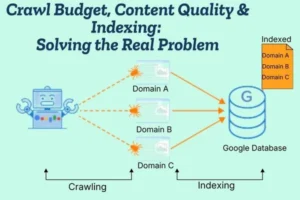
- Understand Crawl Budget
Crawl budget is the number of pages Google is willing to crawl on your website within a certain time. If your site has too many low-quality or unnecessary pages, Google may waste its crawl budget and ignore important pages. You can track indexing issues inside Google Search Console. - Focus on High-Quality Content
Google prefers helpful, detailed, and unique content. If your pages are thin, copied, or not useful, Google may crawl them but decide not to index them. Strong content increases indexing chances. - Remove Low-Value Pages
Too many weak or outdated pages reduce overall site quality. Delete or improve pages that do not provide real value. A clean website helps Google prioritize better pages. - Improve Internal Linking
Internal links show Google which pages are important. Link new or important pages from strong pages like your homepage or popular blog posts. This improves crawl efficiency and indexing speed. - Fix Technical SEO Issues
Slow website speed, server errors, wrong canonical tags, or noindex tags can block indexing. Make sure your website is technically healthy and loads properly. - Avoid Duplicate Content
If multiple pages target the same topic, Google may index only one version. Keep your content unique and focused on one clear keyword per page. - Build Website Authority
Websites with stronger authority get crawled more often. Publish quality content regularly and earn natural backlinks. As trust increases, indexing becomes faster. - Keep Your Sitemap Updated
An updated XML sitemap helps Google discover important pages quickly and improves indexing flow.
Why Your Pages Stay Invisible in Google And How to Fix It
If your pages are not appearing in Google search results, it usually means they are not indexed. You can check this inside Google Search Console.
If a page is not indexed, it cannot rank — no matter how good your keywords are. This is why many websites feel “invisible” in Google.
Your Page Is Not Indexed
Sometimes Google discovers or even crawls a page but does not add it to the index. This can happen if Google does not see enough value in the content.
Without indexing, your page will never appear in search results.
Weak or Thin Content
If your content is too short, copied, or not helpful, Google may ignore it. Search engines prefer pages that clearly answer user questions and provide complete information.
Improving content quality is one of the fastest ways to solve invisibility issues.
Poor Internal Linking
If no important pages link to your new page, Google may think it is not important. Internal linking helps search engines understand your site structure and page priority.
Strong internal links improve both crawling and indexing.
Technical SEO Problems
Technical errors can silently block your visibility. Issues like noindex tags, incorrect canonical tags, slow speed, or server errors can prevent your page from being indexed.
Even small technical mistakes can make your pages invisible.
Low Website Authority
New websites or sites without backlinks often struggle with visibility. Google may crawl the pages but delay indexing until more trust is built.
Building authority through consistent quality content and natural backlinks improves indexing speed.
Too Many Low-Quality Pages
If your website has many weak or duplicate pages, it reduces overall site quality. Google may limit crawling and indexing because of this.
Cleaning up unnecessary pages can improve visibility.
How to Fix the Problem
Start by improving content quality and making it more helpful. Add strong internal links from important pages. Fix technical errors and ensure your site loads quickly.
Use Google Search Console to request indexing for important pages. Over time, as your website quality and authority improve, your pages will start appearing in search results.
Complete Guide to Fixing “Discovered – Currently Not Indexed” Errors
When you see “Discovered – Currently Not Indexed” in Google Search Console, it means Google has found your page URL but has not crawled it yet. Since the page is not crawled, it is not added to Google’s index and cannot appear in search results.
This is not a penalty. It simply means Google has delayed visiting your page.

Why This Issue Happens
This issue usually appears when Google does not consider the page a high priority for crawling. It can happen on new websites, websites with many low-quality pages, or sites with technical problems.
If your website has weak content, poor internal linking, or slow speed, Google may delay crawling.
Improve Content Quality
The first step is to make your content stronger. Ensure your page provides helpful, clear, and detailed information. Avoid very short or copied content.
Google prefers pages that clearly answer user intent and provide real value.
Strengthen Internal Linking
Internal links help Google understand which pages are important. Link the affected page from your homepage, category pages, or strong blog posts.
Better internal linking increases crawl priority.
Check Technical SEO
Make sure your website loads quickly and does not have server errors. Also confirm that your page is not blocked in robots.txt and does not contain a noindex tag.
Technical problems can prevent Google from crawling efficiently.
Update and Submit SitemapEnsure your XML sitemap is updated with the correct URLs. Submit it inside Google Search Console so Google can easily discover your important pages.
Request Indexing ManuallyUse the URL Inspection tool in Google Search Console. Enter the page URL and click “Request Indexing.”
While this does not guarantee instant indexing, it can speed up the process.
Remove Low-Quality PagesIf your website has many thin, duplicate, or outdated pages, improve or remove them. A cleaner website improves crawl efficiency and indexing chances.
Technical and Content Fixes to Get Your Pages Indexed Faster
If your pages are not appearing in search results, it usually means Google has not indexed them yet. You can check this status inside Google Search Console.
Indexing delays often happen because of weak content signals or technical SEO problems. To get indexed faster, you need to improve both.
Content Fixes That Improve Indexing
• Create High-Quality, Helpful Content Make sure your page clearly answers the user’s question. Write detailed, useful, and original content. Avoid very short or copied text.
When Google sees strong value, it is more likely to index the page quickly.
• Focus on One Clear Topic Each page should target one main keyword or topic. If your content is mixed or unclear, Google may not understand its purpose. Clear focus improves indexing chances.
• Update Old or Thin Pages Improve weak pages by adding better explanations, examples, and updated information. Removing or improving thin content strengthens your overall website quality.
• Avoid Duplicate Content If multiple pages are similar, Google may ignore some of them. Keep each page unique and valuable.
Technical Fixes That Speed Up Indexing
• Improve Website Speed A fast website helps Google crawl more pages in less time. Optimize images, reduce heavy scripts, and use reliable hosting.
• Check for Noindex Tags Make sure your important pages do not have a “noindex” tag. This tag tells Google not to add the page to its index.
• Review Robots.txt Settings Ensure your robots.txt file is not blocking important pages from being crawled.
• Fix Canonical Tag Issues Incorrect canonical tags can tell Google to index another page instead of yours. Make sure canonical URLs are set correctly.
• Strengthen Internal Linking Link your important pages from your homepage and other strong pages. Internal links help Google discover and prioritize content.
• Submit and Update Sitemap Keep your XML sitemap updated and submit it in Google Search Console. This helps Google find your pages faster.
• Request Indexing Manually Use the URL Inspection tool in Google Search Console and click “Request Indexing” for important pages. This can speed up crawling.
Discovered but Not Indexed? Proven SEO Strategies to Solve It in 2026
If you see “Discovered – Currently Not Indexed” inside Google Search Console, it means Google has found your page URL but has not crawled it yet. Since it is not crawled, it is not added to Google’s index and cannot rank in search results.

In 2026, indexing depends more on overall site quality, trust, and technical health than ever before.
Why This Happens in 2026
Search engines are now more selective. Google focuses on high-quality websites and avoids wasting resources on low-value pages. If your website has weak content, too many thin pages, or technical issues, Google may delay crawling.
New websites and low-authority domains often face this issue more frequently.
Proven SEO Strategies to Fix It
• Publish Strong, Helpful Content
Content must fully satisfy user intent. Write clear, detailed, and original content that solves real problems. Avoid short or generic pages.
Google prioritizes pages that provide genuine value.
• Reduce Low-Quality Pages If your website has outdated, duplicate, or thin content, improve or remove it. A cleaner website helps Google use crawl budget wisely and focus on important pages.
• Improve Internal Linking Structure Link your important pages from high-authority pages like your homepage or popular blog posts. Strong internal linking signals importance and improves crawl priority.
• Optimize Website Speed and Performance Fast-loading websites are crawled more efficiently. Improve hosting quality, compress images, and remove unnecessary scripts to improve performance.
• Check Technical SEO Signals Ensure your page is not blocked by robots.txt and does not contain a noindex tag. Also verify canonical tags are correctly set.
Technical errors can silently delay indexing.
• Keep Sitemap Updated Maintain an updated XML sitemap and submit it through Google Search Console. This helps Google discover and prioritize your pages faster.
• Request Indexing Strategically Use the URL Inspection tool to request indexing for important pages. Do not overuse it — focus only on valuable content.
The 2026 SEO Mindset
In 2026, indexing is about quality, structure, and trust. Google wants to index pages that are helpful, technically clean, and connected within a strong site structure.
If your pages are “discovered but not indexed,” focus on improving content depth, cleaning your website, strengthening internal links, and maintaining technical health.
With consistent optimization, your pages will move from “discovered” to fully indexed and ready to rank.

