
Alt Text Examples: Best Practices + Mistakes to Avoid
In today’s digital world, images play a crucial role in web design, content marketing, and user experience. However, images alone are not enough to make a website accessible, searchable, and SEO-friendly. This is where alt text examples (alternative text) become extremely important.
Alt text helps search engines understand images, improves accessibility for visually impaired users, and enhances overall website performance. Despite its importance, many website owners still misuse or completely ignore alt text.
What Is Alt Text?
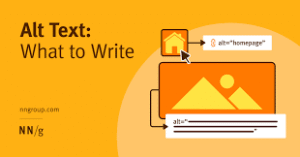
Alt text, short for alternative text, is a written description added to an image’s HTML code. It describes the content and purpose of an image when the image cannot be displayed or when a user relies on a screen reader.
Example:
<img src=”seo-image.jpg” alt=”SEO optimization process for websites”>
If the image fails to load or a visually impaired user uses a screen reader, the alt text explains what the image represents.
Why Is Alt Text Important?
Alt text is not just a technical requirement; it is a key element that improves accessibility, SEO performance, user experience, and legal compliance. When used correctly, alt text makes your website more inclusive and search-engine friendly while helping users understand visual content even when images are unavailable.
1. Accessibility
Accessibility is the primary and most important purpose of alt text. Visually impaired users rely on screen readers to browse the internet. Screen readers cannot interpret images on their own, so they read the alt text aloud to explain what the image represents.
Without alt text, users may miss important information that is conveyed through images such as charts, buttons, product photos, or infographics. Proper alt text ensures that all users, regardless of physical ability, can access and understand your content.
2. SEO Benefits
Search engines cannot see images the way humans do. Instead, they rely on text-based signals to understand image content. Alt text provides this critical information to search engines like Google.
When you write descriptive and keyword-relevant alt text, it helps:
-
Search engines understand what the image is about
-
Improve rankings in Google Image Search
-
Strengthen the relevance of your page for targeted keywords
3. Better User Experience
Alt text improves user experience in situations where images fail to load due to slow internet connections, technical issues, or disabled images. Instead of seeing a broken image icon, users can read the alt text and understand what the image was meant to show.
This is especially helpful for:
-
Users on slow or unstable networks
-
Mobile users with limited data
-
Browsers that block images by default
4. Legal Compliance
Many countries have accessibility laws and guidelines that require websites to be usable by people with disabilities. Standards such as WCAG (Web Content Accessibility Guidelines) and laws like the ADA (Americans with Disabilities Act) emphasize the importance of alternative text for images.
Websites that fail to meet accessibility requirements may face:
-
Legal notices or lawsuits
-
Penalties or fines
-
Damage to brand reputation
By implementing proper alt text, website owners can reduce legal risks and demonstrate a commitment to accessibility and social responsibility. Alt text helps ensure compliance while also benefiting SEO and user experience.
How Alt Text Works in SEO
Search engines use alt text to:
-
Understand image relevance
-
Rank images in Google Image Search
-
Associate images with surrounding content
-
Improve the topical authority of a webpage
Well-written alt text can indirectly boost your page’s organic visibility by improving engagement and accessibility signals.
Alt Text Examples (Good vs Bad)
Example 1: Product Image
Bad Alt Text:
Good Alt Text:
Example 2: Blog Image
Bad Alt Text:
Good Alt Text:
Example 3: Decorative Image
Correct Usage:
alt=""Best Practices for Writing Alt Text
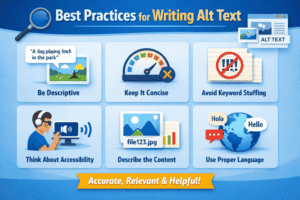
Following best practices ensures your alt text is effective for both users and search engines.
1. Be Descriptive but Concise
Alt text should clearly describe the image in 125 characters or less.
Example:
2. Focus on Image Purpose
Describe what the image does, not just what it looks like.
Example:
3. Use Keywords Naturally
Including keywords is good, but they must fit naturally.
Correct:
Wrong:
4. Avoid “Image of” or “Picture of.”
Screen readers already announce images.
❌ Wrong:
✅ Correct:
alt="Laptop displaying website analytics dashboard"
5. Match Alt Text with Page Content
Alt text should relate directly to the topic of the page and the surrounding content. When alt text matches the page’s subject, it helps search engines understand image relevance and improves SEO. It also ensures screen reader users receive accurate and meaningful information.
6. Use Proper Grammar
Alt text should be written in clear, natural language with correct grammar. Since screen readers read alt text aloud, well-structured sentences improve understanding and accessibility. Avoid keyword stuffing or incomplete phrases.
7. Write Unique Alt Text for Each Image
Each image should have its own unique alt text. Copying the same alt text for multiple images can confuse users and reduce SEO value. Unique descriptions help search engines and users understand each image clearly.
Alt Text Examples for Different Use Cases
1. Blog Images
2. E-commerce Products
3. Infographics
4. Icons
5. Buttons
Common Alt Text Mistakes to Avoid
Many websites fail to benefit from alt text because of common errors.
1. Leaving Alt Text Empty (When It’s Needed)
Important images without alt text reduce accessibility and SEO value.
2. Keyword Stuffing
Overloading alt text with keywords looks spammy and harms SEO.
❌ Example:
3. Writing Too Long Descriptions
Alt text should not be a paragraph.
4. Using File Names as Alt Text
❌ Example:
5. Misleading Descriptions
Alt text must accurately describe the image.
6. Ignoring Decorative Images
Decorative images should have empty alt text, not unnecessary descriptions.
Alt Text vs Title Attribute
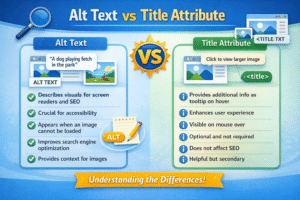
Many people confuse alt text with the title attribute.
| Feature | Alt Text | Title Attribute |
|---|---|---|
| Accessibility | ✅ Yes | ❌ No |
| SEO Value | ✅ High | ❌ Low |
| Screen Readers | ✅ Read | ❌ Optional |
Alt text is far more important for SEO and accessibility.
How to Add Alt Text (Step by Step)
In HTML
In WordPress
-
Upload image
-
Click image
-
Add description in the Alt Text field
-
Save
In Shopify
-
Open product image
-
Click “Add alt text.”
-
Save changes
Alt Text for Accessibility (WCAG Guidelines)
According to WCAG:
-
All informative images must have alt text
-
Decorative images should have empty alt attributes
-
Text inside images must be described
Conclusion
alt text examples are a small but powerful element that significantly impacts accessibility, SEO, and user experience. Writing effective alt text is not just about filling in a field; it requires thoughtful descriptions that match your page content, use proper grammar, and remain unique for each image.
By following best practices and avoiding common mistakes, you make your website inclusive for visually impaired users, improve your search engine visibility, and create a better experience for all visitors.
