
SEO Checklist
SEO (Search Engine Optimization) is incredibly important for digital marketing. It will improve the position of your website within the search engines (primarily Google) and as a result, your website will get a higher volume of visitors, increase the amount of traffic coming into your website, and increase the overall growth of your business. It’s important to note that SEO is not a single task; there are many smaller tasks that need to be completed in order for your website to become successful based on SEO.
An SEO checklist will help you make sure that your website meets best practices when following established SEO practices (you can follow this link: “What is an SEO Checklist?”). An SEO checklist is a step-by-step approach to everything from keyword research to on-page optimization, technical SEO, and link building.
Why an SEO Checklist Is Important for Websites
Using an SEO checklist will optimize and structure your website. You will increase your visibility in the search engines, generate more organic traffic, and improve the user experience. An SEO checklist will also help you save time by providing a clear path to optimize your website, as well as helping you monitor your progress from time to time. An SEO checklist is crucial for websites to assure that they are completing every necessary element related to SEO in a proper and timely manner. There are many ways to optimize your website, including using keywords for search engines, the quality of the content, website load speed, mobile device compatibility, and backlinks. Without having an SEO checklist to refer to while optimizing your website, you will miss an important step in the process that will ultimately impact your site’s ranking in search engines.
How Search Engines Work
People can find information via the internet using the help of search engines like Google which can locate web pages by scanning and analysing their content. Search engines can do this by using special robots called ‘bots’. These bots crawl (or scan) web pages on a site before storing and organising what they have found in an indexed database. When someone does a search using a search engine, the search engine looks in their indexed database to return a list of results containing relevant and useful web pages. Those web pages that contain quality content, include the correct keywords, load quickly and are mobile-friendly will be shown at the top of the list of results.
Website Setup Checklist for SEO Success
The basic building block of search engine optimization (SEO) success is your website. Therefore, you must ensure your website is properly built for search engine optimization (SEO). If your website is structured correctly, then search engines can crawl, index, and rank all of your website pages more easily.
Choose a short, easy-to-remember, and relevant SEO Domain Name. Use HTTPS as your website protocol (secure) because all search engines prefer to have secure websites. Set up your Google Search console & Google analytics account(s); these tools will help you monitor how well your site is performing and find problems before they become a significant issue.
On-Page VS Off-Page SEO Checklist
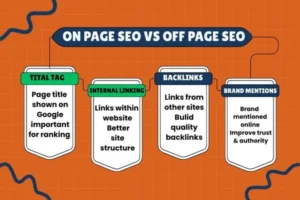
On-page and off-page SEO are two important parts of search engine optimization. Both work together to improve website ranking, traffic, and online visibility.
On-Page SEO Checklist
On-page SEO focuses on optimizing elements inside your website to make it search engine friendly.
- Optimize title tags and meta descriptions
- Use proper heading tags (H1, H2, H3)
- Add keywords naturally in content
- Create high-quality and original content
- Improve URL structure
- Optimize images with alt text
- Use internal linking
- Improve page speed
- Make content easy to read
- Ensure mobile-friendly design
Off-Page SEO Checklist
Off-page SEO focuses on activities done outside your website to build trust and authority.
- Build high-quality backlinks
- Use guest posting on relevant websites
- Share content on social media
- Improve brand mentions
- Get local citations (for local SEO)
- Encourage online reviews
- Avoid spammy links
- Analyze competitor backlinks
- Monitor link quality regularly
Key Difference Between On-Page and Off-Page SEO
On-page SEO helps search engines understand your website content, while off-page SEO builds website authority and trust. Both are essential for long-term SEO success and higher search engine rankings.
Title Tags and Meta Descriptions Optimization
Title tags and meta descriptions are very important parts of on-page SEO. They help search engines understand what your page is about and encourage users to click on your website in search results.
Optimizing Title Tags
The title tag is the main title that appears on search engine result pages. It should clearly describe your page content and include the main keyword. Keep the title short (about 50–60 characters) so it does not get cut off. Make sure every page has a unique title tag and avoid using the same title on multiple pages. A clear and attractive title improves both rankings and click-through rate.
Optimizing Meta Descriptions
Meta descriptions are short summaries shown below the title in search results. They should explain what the page offers in simple and clear words. Try to keep meta descriptions between 150–160 characters and include your main keyword naturally. Although meta descriptions do not directly affect rankings, a well-written description can increase clicks by attracting users.
Best Practices for Better Results
Always write title tags and meta descriptions for users, not just search engines. Use action words, avoid keyword stuffing, and make each one relevant to the page content. Proper optimization helps improve visibility, traffic, and overall SEO performance.
Keyword Research Checklist
Understand Your Target Audience
Before choosing keywords, understand who your audience is and what they are searching for. Think about their problems, needs, and the words they use when searching on Google.
Define Your SEO Goals
Decide what you want to achieve with keyword research, such as more traffic, leads, or sales. Clear goals help you select the right type of keywords.
Find Seed Keywords
Start with basic words related to your topic or business. These are called seed keywords and help you discover more keyword ideas.
Use Keyword Research Tools
Use tools like Google Keyword Planner, Ubersuggest, or Ahrefs to find keyword ideas. These tools show search volume, competition, and related keywords.
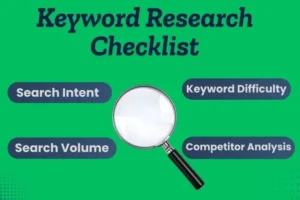
Check Search Volume and Competition
Choose keywords with good search volume and low to medium competition. This makes it easier for your website to rank, especially if it is new.
Focus on Long-Tail Keywords
Long-tail keywords are longer and more specific phrases. They usually have less competition and attract more targeted traffic.
Analyze Search Intent
Understand why users are searching for a keyword. Some keywords are for information, some for buying, and some for comparison. Match keywords with the right content type.
Study Competitor Keywords
Check which keywords your competitors are ranking for. This helps you find new opportunities and improve your own keyword strategy.
Group Keywords by Topic
Organize similar keywords into groups. This helps in creating focused content and better page structure.
Understanding Search Intent in SEO
Search intent means the purpose behind a user’s search. It helps you understand what type of content users want to see when they search a keyword.
Informational Search Intent
Informational intent is when users want to get information or learn something. They are not looking to buy anything. Examples include searches like “what is SEO,” “how search engines work,” or “SEO checklist.” For this intent, blog posts, guides, and tutorials work best.
Navigational Search Intent
Navigational intent is when users want to visit a specific website or page. They already know the brand or platform. Examples include “Google Search Console login” or “YouTube homepage.” For this intent, brand pages and official websites rank best.
Commercial Search Intent
Commercial intent is when users are thinking about buying but want to compare options first. They search for reviews, comparisons, or best lists, such as “best SEO tools” or “SEO services comparison.” For this intent, comparison articles and review content work well.
Transactional Search Intent
Transactional intent is when users are ready to take action, such as buying a product, signing up, or downloading something. Examples include “buy SEO course” or “hire SEO expert.” For this intent, landing pages, product pages, and service pages are most effective.
Content Optimization Checklist
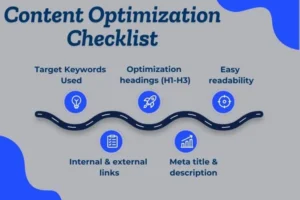
Content optimization means improving your content so it is easy to read, useful for users, and easy for search engines to understand. Well-optimized content helps your website rank higher and keeps visitors engaged.
Create High-Quality and Relevant Content
Your content should solve user problems and answer their questions clearly. Always write original and useful content that matches the topic and search intent.
Use Keywords Naturally
Add your main keyword and related keywords naturally in the content. Use them in headings, paragraphs, and image alt text, but avoid keyword stuffing.
Optimize Content Length
Your content should be long enough to fully explain the topic. Short content may not rank well, while well-structured long content provides more value to users.
Use Headings and Sub-Headings
Break your content into sections using H2 and H3 headings. This improves readability and helps search engines understand your content structure.
Improve Readability
Write in simple words and short sentences. Use bullet points, spacing, and short paragraphs to make content easy to read.
Add Internal and External Links
Link to other relevant pages on your website and trusted external sources. This improves SEO and helps users find more information.
Optimize Images and Media
Use compressed images to improve page speed. Add descriptive alt text so search engines can understand your images.
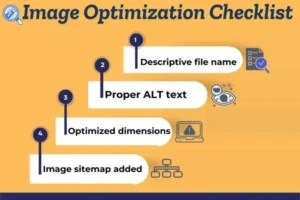
Image Optimization Checklist
Image optimization helps improve website speed, user experience, and search engine rankings. Properly optimized images make your website faster and more accessible for both users and search engines.
Use the Right Image Format
Choose the correct image format for better performance. Use JPEG for photos, PNG for transparent images, and WebP for faster loading with good quality.
Compress Images
Always compress images before uploading them to your website. Smaller image sizes load faster and help improve page speed without losing quality.
Use Descriptive File Names
Rename image files using meaningful words instead of random numbers. Use keywords naturally, for example: image-optimization-checklist.jpg.
Add Alt Text to Images
Alt text helps search engines understand what the image is about and improves accessibility. Write short and clear alt text using relevant keywords.
Optimize Image Size and Dimensions
Upload images in the exact size needed for your website. Avoid using very large images and resizing them with code.
Use Responsive Images
Make sure images work well on all devices, including mobiles and tablets. Responsive images improve user experience and SEO.
Lazy Load Images
Enable lazy loading so images load only when users scroll down the page. This helps improve page speed and performance.
Use Image Sitemaps
Add images to your XML sitemap to help search engines discover and index them easily.
Technical SEO Checklist
Technical SEO focuses on improving the technical aspects of a website so search engines can easily crawl, index, and rank it. A strong technical setup improves website performance, user experience, and search visibility.
Ensure Website Crawling and Indexing
Make sure search engines can crawl your website properly. Check that important pages are not blocked by the robots.txt file and that all key pages are indexed in search engines.
Create and Submit XML Sitemap
An XML sitemap helps search engines find and understand your website pages. Submit your sitemap in Google Search Console for better indexing.
Use HTTPS (SSL Certificate)
Secure websites using HTTPS are trusted by search engines and users. Always install an SSL certificate to protect data and improve SEO.
Improve Website Speed
Page speed is an important ranking factor. Optimize images, reduce unnecessary code, and use caching to make your website load faster.
Mobile-Friendly Website
Your website must work properly on mobile devices. A mobile-friendly design improves user experience and helps rank better on search engines.
Fix Broken Links and Errors
Check and fix broken links, 404 errors, and server issues. These errors negatively affect user experience and SEO.
Optimize URL Structure
Use short, clean, and readable URLs. Avoid unnecessary parameters, numbers, or symbols in URLs.
Use Canonical Tags
Canonical tags help avoid duplicate content issues by telling search engines which page is the main version.
Optimize Robots.txt File
Use robots.txt correctly to guide search engine bots on which pages to crawl or ignore.
Implement Structured Data
Structured data helps search engines better understand your content and can improve search appearance with rich results.
Monitor Technical SEO Regularly
Regularly check your website using SEO tools and Google Search Console to fix issues quickly and maintain SEO health.
SEO Tools and Tracking Performance
SEO tools help you analyze your website, find problems, and improve search engine rankings. Tracking performance is important because it shows what is working and what needs improvement. With the right tools, you can make better SEO decisions.
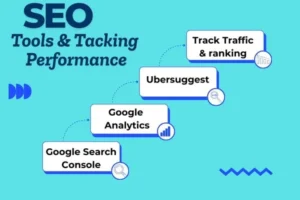
Google Analytics
Google Analytics helps you track website traffic, user behavior, and conversions. It shows how visitors find your site, which pages they visit, and how long they stay. This data helps you improve content and user experience.
Google Search Console
Google Search Console helps you monitor your website’s performance in Google search results. It shows search queries, clicks, impressions, indexing issues, and mobile usability problems. It is essential for technical SEO tracking.
Keyword Research Tools
Tools like Ahrefs, SEMrush, and Ubersuggest help you find keywords, check search volume, and analyze competition. They also help track keyword rankings over time.
SEO Audit Tools
SEO audit tools help identify on-page and technical issues such as broken links, missing meta tags, slow page speed, and crawl errors. Fixing these issues improves overall SEO health.
Backlink Analysis Tools
Backlink tools help you check who is linking to your website. They help identify high-quality links and harmful backlinks that can affect rankings.
Tracking SEO Performance
Track important SEO metrics such as organic traffic, keyword rankings, bounce rate, page speed, and conversions. Regular tracking helps you adjust your SEO strategy and achieve long-term success.
SEO Checklist for New and Existing Websites
SEO strategies can be slightly different for new and existing websites, but the goal is the same: better visibility, more traffic, and higher rankings. Below is a clear checklist for both.
SEO Checklist for New Websites
New websites need a strong foundation so search engines can understand and trust them.
- Choose an SEO-friendly domain name
- Set up HTTPS (SSL certificate)
- Create a clean website structure
- Set up Google Search Console and Google Analytics
- Submit XML sitemap
- Do basic keyword research
- Create high-quality and original content
- Optimize title tags and meta descriptions
- Make the website mobile-friendly
- Improve website speed
- Start internal linking
- Build a few high-quality backlinks
SEO Checklist for Existing Websites
Existing websites focus more on improvement, optimization, and growth.
- Audit website SEO performance
- Update and refresh old content
- Improve on-page SEO issues
- Fix broken links and crawl errors
- Optimize images and page speed
- Improve keyword targeting
- Analyze competitor keywords
- Build more quality backlinks
- Improve user experience
- Track rankings and traffic regularly

